A CleanMyMac alternative. Compare the workflow and the limits.
MacMonitor combines reviewed cleanup, file organization and activity monitoring for macOS 14 or later. Compare the tools, recovery options and license models before choosing.
Who it is for: MacMonitor suits people who want to inspect cleanup candidates, sort a folder with a preview, and monitor their Mac in one native app. Developers can also review supported build caches and local model storage. It is not an antivirus, a malware-removal tool or an automatic performance optimizer.
You may want a different organization workflow, a particular developer tool, a simpler license, or support for your macOS version. A one-time purchase alone does not distinguish these apps: CleanMyMac offers one-time and subscription options. Compare the edition and features you actually need.
CleanMyMac vs MacMonitor
Competitor documentation checked November 4, 2026. This is a comparison of documented capabilities, not a comparative performance test. CleanMyMac features can differ by edition and plan.
On a small screen, scroll the table sideways to compare both apps.
Cleanup, organization and monitoring workflows
Area
MacMonitor
CleanMyMac
Disk cleanup
Supported junk and developer categories, with item review.
Cleanup module for system junk and other supported categories.
Large-file discovery
Large & Old scans a chosen folder.
My Clutter finds large and old files; Space Lens maps storage.
Duplicates
Exact-content duplicate groups with a retained copy.
Documents duplicate and similar-photo discovery.
File organization
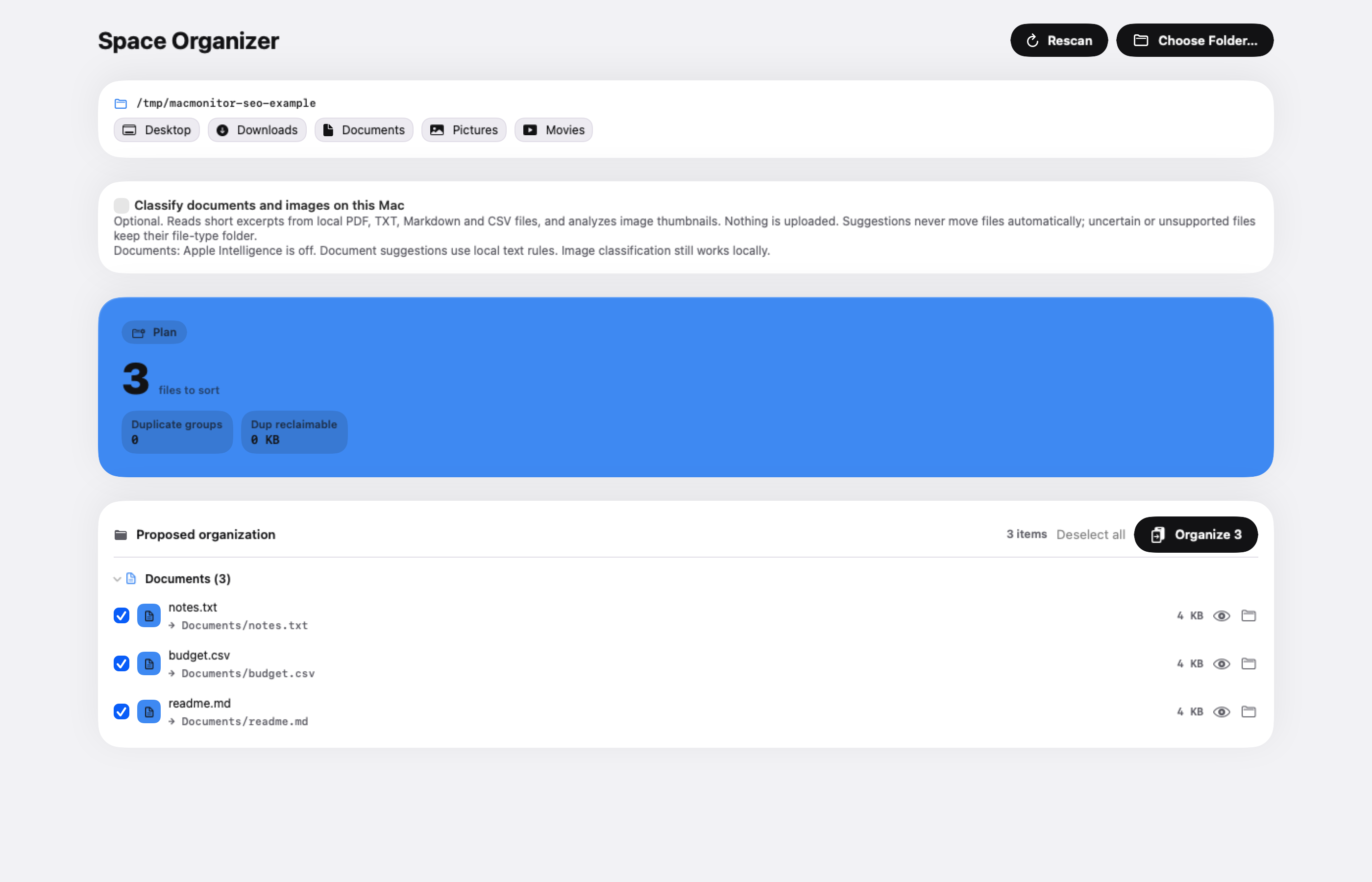
Preview moving chosen files into type folders; session undo.
My Clutter helps review and remove clutter. The cited documentation does not establish a matching type-folder move workflow.
System monitoring
Activity and menu bar readings where available.
Menu tools for performance, battery, storage and network.
Review before deletion
Review items and confirm the action.
Cleanup supports reviewing junk before selecting items to remove.
Undo or recovery
Put Back for supported Trash moves; permanent removals cannot be undone. Organizer undo is for the last organization during the session.
Check the specific action and backup options before cleaning. We have not verified a general equivalent to MacMonitor's Put Back.
License model
One-time purchase for one Mac.
Monthly, annual and one-time options on MacPaw's direct store.
Supported macOS
macOS 14 or later.
MacPaw's current direct-store page lists macOS 11 or later.
Malware removal
Not provided.
Listed in MacPaw's product description; check edition availability.
How the cleanup workflows compare
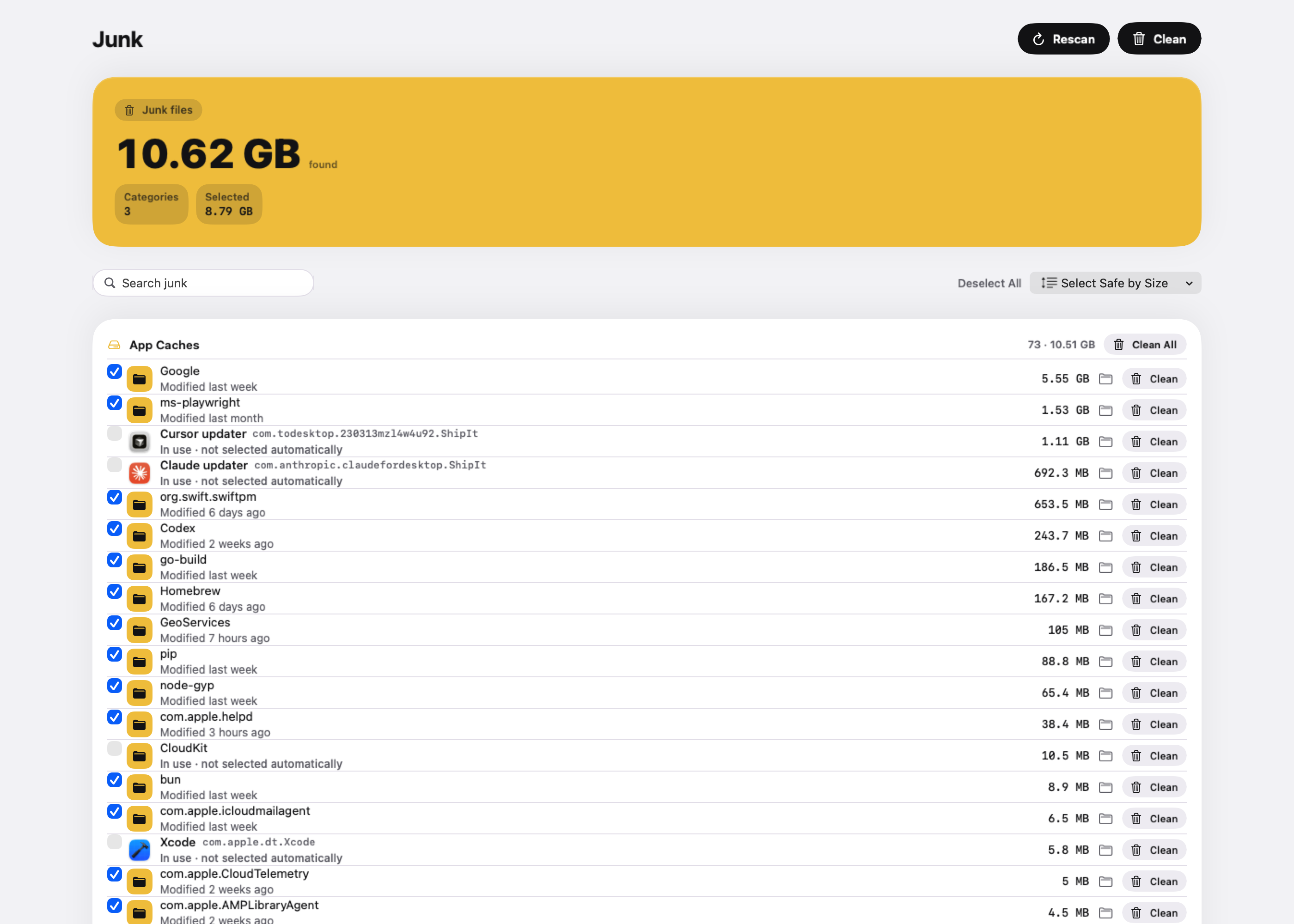
In MacMonitor, choose a tool, scan supported locations, inspect the paths and sizes, select candidates, then confirm. Most supported file removals go to the Trash; local model removal and simulator erasure have permanent consequences. Read the Cleaner workflow and recovery limits.
CleanMyMac's documented Cleanup flow is scan, review categories, select items and clean. It also provides summary actions. Review is available in both apps; it would be misleading to present it as exclusive to MacMonitor.
Pricing and license terms
MacMonitor's public checkout was checked at US$4.99, one-time, for one Mac. The site's introductory offer covers the first 50 purchases and states a regular price of US$19 afterward. Availability, taxes and the final price are confirmed at checkout. Activation requires a license key and periodic online checks; see license-request details.
MacPaw’s official store offers monthly, annual and one-time choices. Displayed prices depend on the selected region, currency and promotion. Check the current CleanMyMac store for the exact offer, device count and included edition before comparing it with MacMonitor’s one-Mac license.
Privacy, safety and recovery
MacMonitor processes scans and optional Organizer suggestions locally. The app has no analytics; licensing and a user-initiated update check make the network requests described in its privacy policy. Website analytics are separate and require consent.
Keep a backup of important files. Put Back restores supported Trash moves without overwriting a replacement file; it cannot recover permanent deletion or items after Trash is emptied. Estimated candidate size is not guaranteed reclaimed storage because APFS clones and snapshots can retain blocks.
Compare the job you need to finish
A useful CleanMyMac alternative comparison starts with your requirement. You may need to recover room for a project, review duplicate downloads, organize a folder, or monitor an application that stays busy. List the two or three tasks you actually expect to perform, then check each tool against those tasks and your macOS version.
That approach prevents an unfair feature checklist. A tool can offer more modules while another has a workflow you prefer for one important job. Equally, a cleaner that does not provide malware removal cannot be treated as a replacement for a protection feature you rely on. Decide whether those capabilities are requirements before comparing purchase prices.
Example: a developer choosing a cleanup workflow
Consider a fictional developer with old Xcode output, a Docker environment, and several downloaded local models. The relevant questions are whether the tool identifies supported categories, explains what an action will remove, and leaves needed project data intact. A large headline number is less useful without that detail.
For this user, a sensible evaluation is to inspect the paths and categories first, read the permanent-action warnings, and check the recovery route. If the tool cannot explain a candidate clearly, leave it unselected while you investigate rather than interpreting its size as proof that removal is worthwhile. No comparative speed or storage-saving benchmark was performed for this article.
What does the license include?
A one-time purchase, an annual plan and a monthly plan describe payment arrangements; they do not establish that every edition includes the same features or future major versions. Check device limits, activation requirements, update entitlement, cancellation terms and the seller’s final checkout for the specific offer you choose.
MacMonitor’s direct license is for one Mac, with the activation and verification behavior described in its privacy and sale terms. Its site advertises an introductory offer and a later regular price. CleanMyMac’s official store offers multiple payment models, with prices that can vary by region, currency and promotion. Use the linked official checkout rather than treating a quoted regional price as a permanent global price.
Evaluate recovery before the first cleanup
Ask what happens after an ordinary Trash move, after emptying Trash, and after a permanent action. Those are three different states. A convenient restore button for recorded moves does not make an erased simulator or removed model recoverable. Preserve an independent backup of important data regardless of which cleaner you choose.
It is also worth checking what a failed action looks like. If a file changed after scanning or an application still owns it, a responsible workflow should make the outcome understandable. Judge the itemized result, including skipped or failed items, rather than assuming a success message means every requested action completed.
Questions when comparing Mac cleaners
Is MacMonitor a Mac cleaner without a subscription?
The direct product is sold as a one-time purchase, subject to the listed license terms. That is a payment-model statement, not a promise that every competing product requires a subscription. CleanMyMac also offers a one-time option in its direct store.
Can I choose purely by the cleanup estimate?
No. Estimates may use different categories and size definitions, and some candidates may still be useful. Compare the exact paths, consequences and recovery behavior before treating a larger number as a better result.
Which is the right choice for an older Mac?
Start with the actual operating system supported by your machine and the current requirements for the edition you intend to buy. MacMonitor requires macOS 14 or later. A comparison is only useful if the product can run on your setup.
CleanMyMac is a trademark of MacPaw Way Ltd. MacMonitor is independent of MacPaw. Competitor details describe official documentation checked on the date above.
MacBook Pro M4 Pro, 48 GB RAM; macOS 26.6.2; MacMonitor debug 1.0.0; November 4, 2026. Read-only Junk scan: 10.62 GB found and 8.79 GB selected in this capture. Nothing was cleaned or deleted. These are candidate sizes, not measured reclaimed storage or a typical result.MacBook Pro M4 Pro, 48 GB RAM; macOS 26.6.2; MacMonitor debug 1.0.0; November 4, 2026. Read-only preview of three temporary example files. No files were moved; classification was off. This demonstrates the preview, not completed organization or reclaimed storage.
Do it in one place
MacMonitor is a Mac cleaner, file organizer and activity monitor for macOS 14 or later. One-time purchase.